Run DeepSeek Inside VS Code. Copilot's Meter Stops Running.
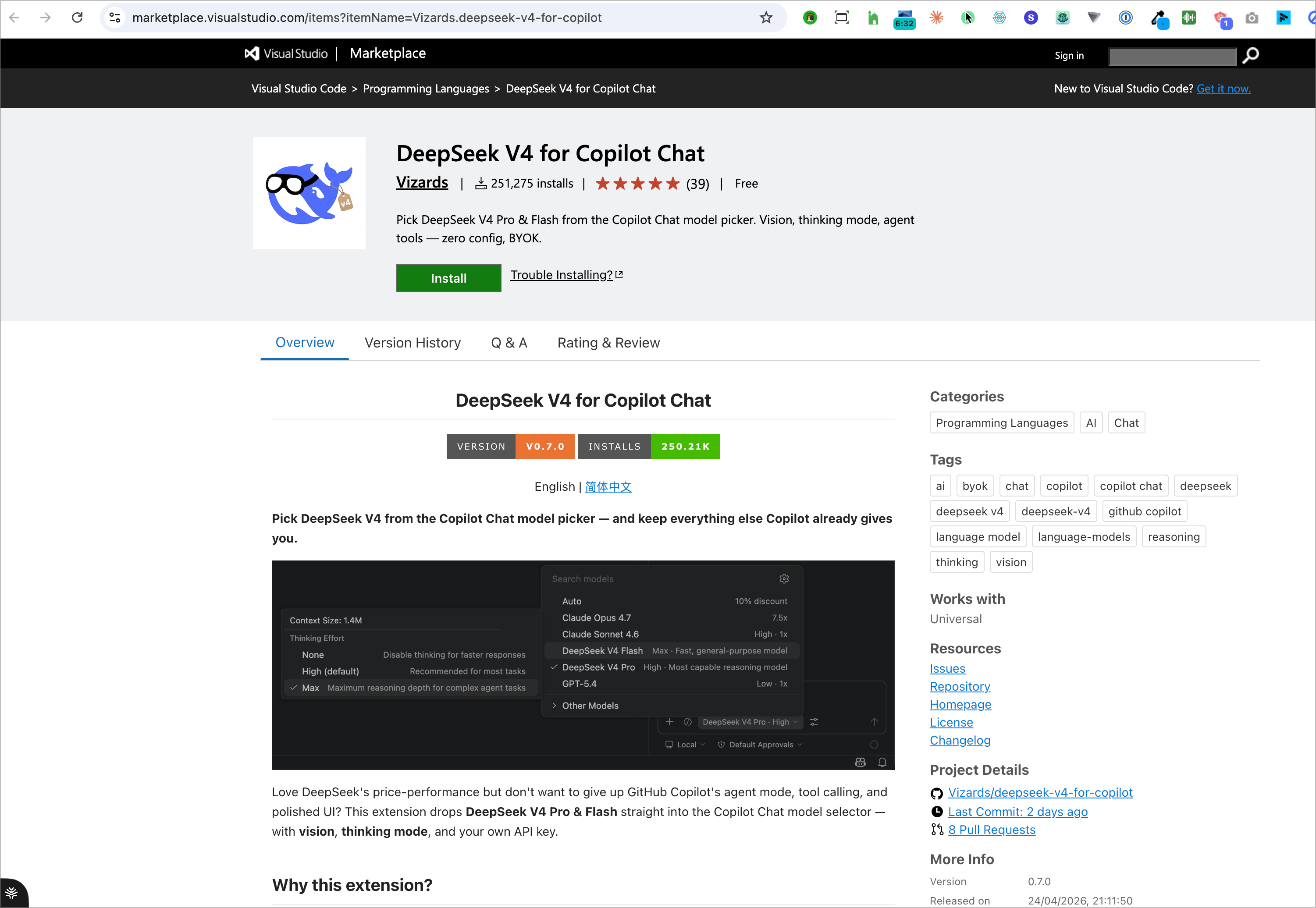
A free extension drops DeepSeek V4 Pro and Flash into GitHub Copilot's model picker — agent mode, tool calling and MCP intact, and no request multiplier beside them. It also needs a Copilot subscription, and DeepSeek did not write it.
Copilot's model picker has a column for what each model costs you.
DeepSeek's rows are blank.
There is a free VS Code extension that drops DeepSeek V4 Pro and V4 Flash straight into the GitHub Copilot Chat model picker. Not a separate chat window, not a second sidebar — the same picker you already use, with two more models in it.
Look at the list and every other model is carrying a number. Claude Opus 4.7 costs 7.5×. Claude Sonnet 4.6 and GPT-5.4 sit at 1×. Auto advertises a 10% discount. Those are request multipliers, and they draw down the allowance that comes with your Copilot plan.
The two DeepSeek rows do not carry a multiplier. They carry a thinking level and a description instead — because the tokens are billed to your own API key, not to Copilot. You keep agent mode, tool calling, skills and MCP. You stop spending Copilot requests to use them.
Snapshot: 8 August 2026, extension version 0.7.0. Every step below is read off DeepSeek's own integration docs and the marketplace listing, both linked at the end. Setup instructions rot faster than anything else on this site — open the docs alongside this page.
This does not replace GitHub Copilot. It requires it.
Every version of this setup gets filmed as a way off Copilot — swap the expensive American model for the cheap Chinese one and stop paying Microsoft. That is backwards. The extension is a passenger inside Copilot Chat. It has no window of its own.
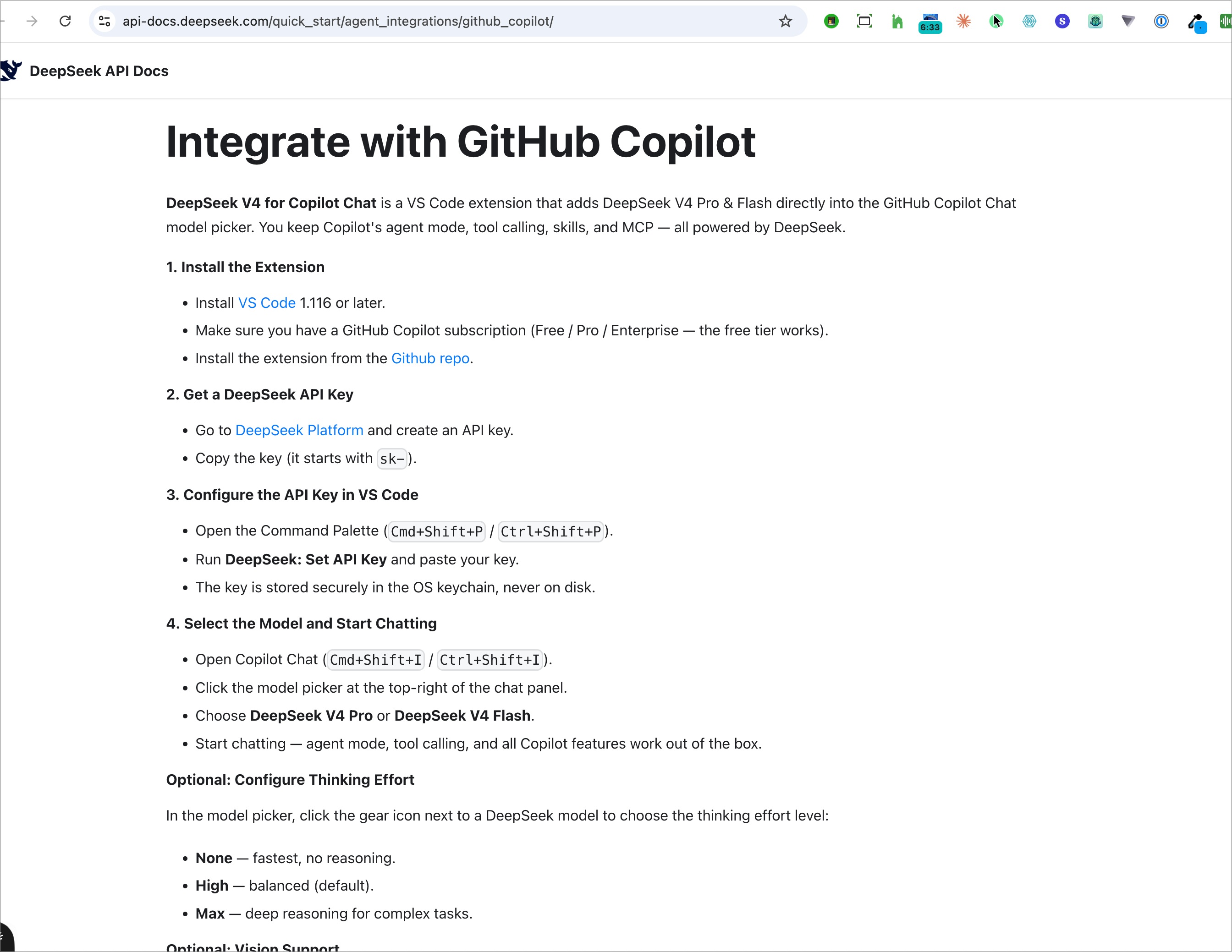
DeepSeek's documentation lists the prerequisites plainly, and one of them is a GitHub Copilot subscription. Free, Pro or Enterprise — and the docs are explicit that the free tier is enough. You also need VS Code 1.116 or later. No Copilot account means no model picker, which means there is nothing for the extension to put DeepSeek into.
So the honest framing is not "escape Copilot." It is: keep the harness, change what is driving it.
Three things, and you probably have two of them.
- VS Code 1.116 or later. Older builds do not expose the model picker the extension hooks into. Check before you debug anything else.
- A GitHub Copilot subscription. The free tier works. This is the prerequisite people skip and then cannot explain why the models never appear.
- A DeepSeek API key. Created at platform.deepseek.com/api_keys. It starts with
sk-, and it is shown exactly once.
DeepSeek documents it. DeepSeek did not write it.
The extension is DeepSeek V4 for Copilot Chat, and the publisher on the marketplace listing is Vizards — not DeepSeek. At the time of writing it shows 251,275 installs, 39 ratings, version 0.7.0, and it is free.
DeepSeek links to it from their own integration docs. That is an endorsement, and an endorsement is not authorship. It matters here more than it usually would, because the very next step is handing this extension an API key that can spend your money.
The source is public at Vizards/deepseek-v4-for-copilot. If you are putting a key with a balance behind it on a work machine, that repository is the thing to read first — not this page.
It is shown once, and it does not go in settings.json.
Create the key on the DeepSeek platform. The dialog says the quiet part out loud: you will not be able to view it again, and if you lose it you generate a new one. Copy it then, not later.
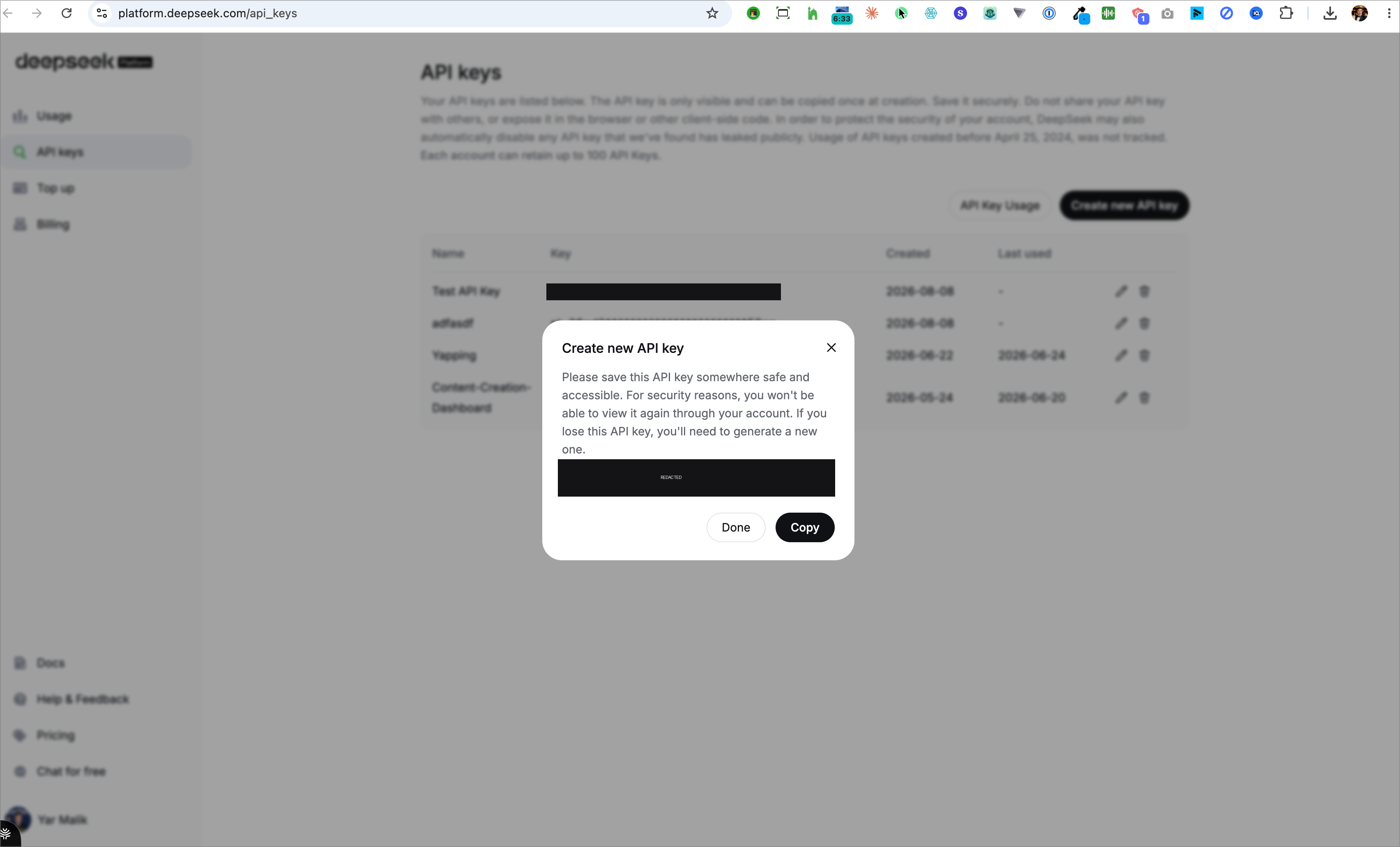
That key is a bearer credential. Anyone holding it can spend your balance, and the API keys page warns that DeepSeek may automatically disable any key it finds has leaked publicly. Which is the polite way of saying: people put these in screenshots and videos constantly, and it costs them. If a key of yours has ever been on screen, revoke it and issue another — it takes ten seconds and it is the cheapest thing you will do all week.
Then set it in VS Code. Open the Command Palette with Cmd+Shift+P or Ctrl+Shift+P, run DeepSeek: Set API Key, and paste. There is no settings field to fill in and nothing to add to settings.json. Per DeepSeek's docs the key is stored in the OS keychain, never on disk — so it is not sitting in a config file you might commit, and it is not travelling in a synced settings blob.
Open the chat, open the picker, and it is just there.
Open Copilot Chat with Cmd+Shift+I or Ctrl+Shift+I. The model picker is at the top-right of the chat panel. DeepSeek V4 Pro and DeepSeek V4 Flash are in the list, and picking one is the whole switch.
What survives the switch is the part that makes this worth doing at all: agent mode, tool calling, skills and MCP all keep working. The docs' phrase is "out of the box." You have not moved to a different tool with a different set of habits — you have changed which model is answering inside the tool you already know.
The saving is not the token price. It is the meter.
Every walkthrough of this setup argues about price per million tokens. That argument is real but it is the second-order one, and it misses what the picker is actually showing you.
Copilot meters its own models in premium requests, at a multiplier per model, drawn against a monthly allowance. In that list: Auto at a 10% discount, Sonnet 4.6 and GPT-5.4 at 1×, Opus 4.7 at 7.5×. Burn the allowance and the good models stop being available to you until the month turns over — which is the actual constraint most people run into, long before the invoice is.
A model you bring your own key for is not on that meter. Your key pays for the tokens; Copilot supplies the harness. So the question this setup really answers is not "is DeepSeek cheaper per token than Opus." It is "what is Copilot's agent harness worth to me if using it costs zero premium requests?"
And the discipline that applies to every cheap model applies here too: a low per-token rate is not a low price per finished task. A model that needs three attempts at a cent can cost more than one that gets it right at a dollar. Watch spend per completed piece of work, not the rate card.
Thinking effort is the quality control, and it is one click off the path.
In the model picker, the gear icon next to a DeepSeek model opens a thinking-effort setting with three positions:
- None — thinking disabled, for the fastest responses.
- High — the default, and what the docs recommend for most tasks.
- Max — maximum reasoning depth, aimed at complex agent tasks.
The picker also reports the context size the extension is working with: 1.4M.
This is the setting that decides whether the model feels sharp or sloppy, and almost every walkthrough stops at "choose the model" without mentioning it exists. If you set it to None to make things snappy and later conclude the model is not very good at agent work, you did that — not the model.
The expensive failure is thinking you switched when you did not.
There is one failure here that costs money silently: the picker falls back, you keep working, and you spend Copilot's premium requests all afternoon believing you are on your own key. It looks identical from the inside. Two checks, both fast:
- Read the composer. The model chip sits at the bottom of the chat box and names what is actually answering — it should read DeepSeek V4 Pro or Flash, with the thinking level beside it.
- Read the usage page. Send one real request, then open your DeepSeek usage page. If the request happened on your key, it appears there. If that page stays flat, you are still on a Copilot model no matter what the picker looked like.
The second check is the one that counts, because it is the only one that reads from the side that bills you.
All three are plumbing. None of them are the model.
The models never appear in the picker. VS Code is below 1.116, or there is no Copilot subscription on the account. The extension installs happily either way and then has nothing to attach itself to — which is why this looks like a broken extension rather than a missing prerequisite.
The key is rejected. It is displayed once at creation; if the dialog got closed before the copy, that key is gone and the fix is a new one, not a recovery. Also worth ruling out: a key that was on screen somewhere public may have been auto-disabled.
It answers fast and acts dumb. Check thinking effort before you blame the checkpoint. None disables reasoning entirely, and on agent work the difference between None and Max is not subtle.
Who this is obviously right for, and who should not bother.
Do it if you already pay for Copilot and keep hitting the premium-request ceiling. You are not buying a new tool, you are removing the thing that stops you mid-month.
Do it if you want agent mode, tool calling and MCP but not the model bill that usually comes attached to them. That combination is the entire point of the extension.
Think first if this is a work machine or client code. A third-party extension holds your key, and the mitigation — the OS keychain — is a good one, but the decision is still yours to make deliberately rather than by default.
Skip it if you do not have a Copilot account and do not want one. This route needs it. Pointing a terminal agent straight at the API is the setup that does not, and it is written up separately on this site.
Bottom line: ten minutes, one extension, one key, and Copilot's harness keeps working with the meter switched off. Then check your usage page once — because the only failure that actually costs you is the one where you think the routing took and it did not.